My iPhone Ate My Obsidian Settings
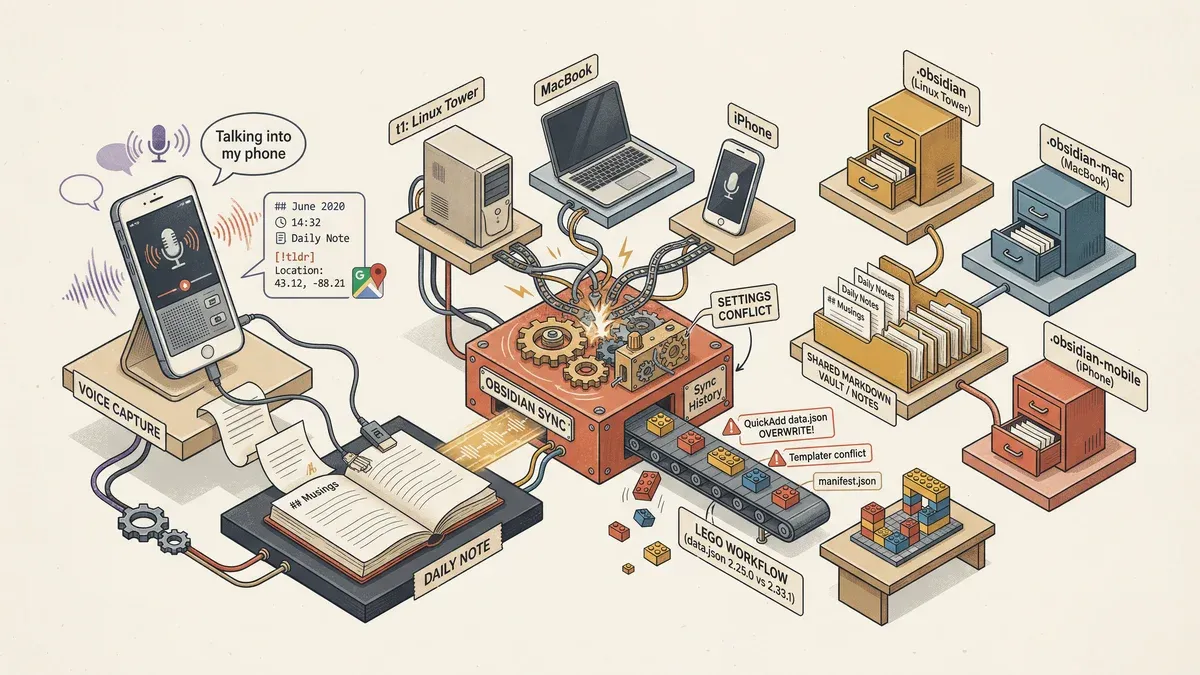
I started this project because I wanted to talk into my phone and have the result land in the correct place in Obsidian.
That sounds simple enough.
My Daily Notes have been the center of my Obsidian vault since June 2020. On the desktop I use QuickAdd and Templater to put timestamped entries into the current day. On my phone I used Drafts for years because it was fast, predictable, and only needed one tap to send text into the vault.
Obsidian's native Quick Capture changed the equation. It works from iOS, accepts voice, can save a recording, and can attach the location where a thought was captured. I wanted that convenience without giving up the Daily Note structure I already had.
Instead, my first test pasted an entire unprocessed Templater template into the bottom of the note.
Then, while fixing that, Obsidian Sync replaced my newer QuickAdd configuration with an old copy from the iPhone and erased a LEGO workflow we had built a few days earlier.
The missing LEGO command was annoying. The explanation was more useful.
I gave Codex the two templates, the damaged Daily Note, and a screenshot from the phone. It could inspect the vault directly, including the plugin configuration that never appears in an ordinary note. What began as a template comparison turned into a file-by-file account of which device had changed what.
Quick Capture was doing exactly what I told it to do
My original Daily Note template looked like this:
# <% tp.date.now("dddd, MMMM Do, YYYY") %>

## Musings

## WORKSPACE
That worked when Templater handled the creation of the note. Native iOS Quick Capture was a different path. I had accidentally selected dailyNote as the capture template, so every capture appended the full template to the existing note. Quick Capture copied the text. It did not ask Templater to execute the <% ... %> command afterward.
The strange placement was not random either. Native Quick Capture offers append or prepend. It does not have QuickAdd's ability to find ## Musings and insert text beneath it.
The solution was to stop asking one template to do two jobs.
The Daily Note itself now uses Obsidian's native date syntax:
# {{date:dddd, MMMM Do, YYYY}}

## Musings
The old WORKSPACE heading is gone. I used that section as a scratchpad years ago, but a separate sidebar note has taken over that job.
The iOS capture template is only responsible for one entry:
## {{date:MMMM Do, YYYY}} - {{time:HH:mm}}

{{content}}

> [!tldr]- Location
> {{fullAddress}}
>
> {{googleMapsLink}}

---
The full address gives me the human context. The Google Maps link keeps the captured coordinates. Looking back at where I was when I recorded a note often explains where my head was at, much like location data in a photo library.
QuickAdd uses its own tokens, so the desktop version produces the same visible result with different source text:
## {{DATE:MMMM Do, YYYY}} - {{DATE:HH:mm}}

{{VALUE}}

---
Both methods append to the bottom of the Daily Note. The result stays chronological, and neither route depends on the other one being available.
That solved the capture problem. Then Sync brought back an older problem I had never properly diagnosed.
Obsidian Sync has no master copy
My vault lives on three devices:
t1, a Linux tower and the machine I consider primary- an iPhone used for capture and quick reference
- a MacBook used as a secondary computer
All three devices were connected to the same remote vault. All three had vault configuration sync enabled for main settings, appearance, core plugins, community plugins, and community plugin settings.
I thought of the Linux configuration as the master copy. Obsidian did not.
The terms "primary" and "secondary" appear in Obsidian's Sync documentation, but they describe a setup procedure. Sync does not turn the primary device into a one-way source of truth. A settings file changed later on the phone or laptop can travel back to the desktop.
That difference had been hiding in plain sight.
My vault had 58 installed community plugins, 47 active plugins, and 36 plugin data.json files. Those JSON files contain the settings that make a plugin mine: QuickAdd choices, paths, macros, prompts, and script references.
Obsidian's documentation explains how settings conflicts are handled. Settings JSON can be merged by applying local keys over the remote JSON. Other files may use the most recently modified copy. Community plugins also tend to save their settings when they start, migrate to a new version, or encounter a configuration they no longer understand.
The conflict-file setting did not protect me here. Nothing had changed simultaneously. The iPhone wrote a later version, and Sync treated it as a normal update.
The Sync history named the culprit
Obsidian keeps a separate version history for settings files. It is tucked under:
Settings > Sync > Vault configuration sync > Settings version history
There were 240 configuration files in the list. The latest entries identified which device had written each one.
The MacBook had recently written app.json, Colored Tags settings, Harbor Tab settings, and several other files. The iPhone had uploaded a cluster of plugin manifests and settings. One entry mattered more than the rest:
.obsidian/plugins/quickadd/data.json
[iPhone]
The iPhone had also uploaded QuickAdd's manifest.json. The version inside it was 2.25.0.
The Linux machine had been running QuickAdd 2.33.1.
That was the whole crime scene. An older mobile copy of QuickAdd had published its package files and settings into the shared configuration folder. The current data.json no longer contained New LEGO Set, lego-new-set, or lego-add-christina-review.
The scripts themselves were still in the vault:
9 meta/scripts/lego-new-set.js
9 meta/scripts/lego-add-christina-review.js
So were the LEGO notes, images, properties, and documentation. Sync had not destroyed the system. It had removed the QuickAdd wiring that exposed it in Obsidian.
Recovery meant restoring the plugin as a unit
I had made a local backup before beginning the Quick Capture work. That saved a lot of fiddling.
With Sync paused and Obsidian closed on the iPhone and MacBook, I restored the complete QuickAdd folder rather than copying only data.json:
.obsidian/plugins/quickadd/
That put main.js, manifest.json, styles.css, and data.json back on the same version. Mixing a 2.33.1 settings file with 2.25.0 plugin code would have invited another migration or rewrite.
The restored folder checked out. QuickAdd was back on 2.33.1. Both LEGO commands pointed to the surviving scripts. The JSON parsed correctly. I then corrected the Daily Note capture by hand so Empty Your Head appends rather than prepends.
If I had not made the backup, Settings version history was the next recovery option. The important detail is to restore quickadd/data.json, not quickadd/manifest.json. The manifest tells Obsidian which plugin version is installed. The data file contains the choices and macros.
Separate profiles stop the devices from voting
Restoring the files fixed the immediate damage. Resuming Sync with the same arrangement would eventually repeat it.
Obsidian supports multiple configuration folders inside one vault. The setting is under Settings > Files and links > Override config folder. A profile name must begin with a period, and Obsidian must be relaunched after it changes.
My intended layout is:
Linux tower   .obsidian
MacBook       .obsidian-mac
iPhone        .obsidian-mobile
The Markdown notes, images, recordings, templates, and other vault contents remain shared. Each device gets its own application and plugin configuration.
This gives up automatic cross-device plugin-setting changes. That is the point. A new QuickAdd macro created on Linux will not quietly appear on the phone, but an old QuickAdd build on the phone cannot delete it from Linux either. Changes can be copied to another profile deliberately after they have been tested.
For a vault that already has suspicious settings history, I would do the split alongside a clean Sync setup:
- Pause Sync and close Obsidian on every secondary device.
- Back up the entire primary vault, including the hidden
.obsidianfolder. - Restore and verify the primary configuration before copying it.
- Create
.obsidian-macand.obsidian-mobilefrom that known-good configuration. - Disconnect every device from the old remote vault.
- Create a fresh remote vault from the primary device and let it finish before connecting anything else.
- Seed the additional profiles, then return the primary device to
.obsidian. - Connect one secondary device at a time. Set its Override config folder, relaunch Obsidian, and wait for a completed sync before moving to the next device.
- Test the commands and plugin versions on every device before deleting old local or remote copies.
Obsidian notes that changing profiles requires Sync settings to be configured again. Those settings are device-specific. On iOS, a force-quit may be needed before downloaded plugin configuration is loaded.
The old remote vault and old local copies should survive until the new setup has been used for a while. Storage is cheap compared with reconstructing an undocumented plugin configuration.
A small capture project found a larger fault
I wanted a microphone button that placed a timestamped thought in my Daily Note. I ended up finding out why settings had occasionally rolled backward for years.
There were two separate mistakes. I had asked native Quick Capture to process a Templater template, which it does not do. I had also assumed that my idea of a primary computer was enforced by Sync.
Neither failure was mysterious once the files were visible. The literal Templater code pointed to the wrong capture template. Settings history showed the iPhone beside QuickAdd 2.25.0. The missing LEGO scripts were still on disk, waiting for their menu entries to return.
That is the part of plain-text software I keep coming back to. The system can still make a mess, but the mess leaves evidence. Templates are text. Plugin settings are JSON. Sync keeps history. Backups remain readable without Obsidian.
And now my phone can record where I was, what I was thinking, and when I thought it, without being allowed to redesign the machine where all of this lives.